

How to File KRA Returns Online in Kenya…..
Filing your KRA returns online doesn’t have to feel like a yearly headache.
Once you know the steps, it takes less time than waiting in a Huduma Centre queue.
Here’s how it works on the iTax portal my friend..
How to File KRA Returns Online in Kenya
First things first: who actually needs to file?
Anyone with an active KRA PIN.
That includes salaried employees (even if your boss already deducted PAYE), self-employed people, landlords, students with a PIN (Unless you have a non-filer student PIN), and those with zero income.
Yes, zero income still means you file a nil return. Skipping it means you pay a penalty later.
What you need before you start
– Your KRA PIN (or national ID number works for login now)
– Your iTax password
– If you’re employed: the P9 form from your employer for the previous calendar year
– Any other income records (rental, business, side hustles)
– A computer or phone with a decent internet connection
– Microsoft Excel if you’re using the full IT1 form (Google Sheets won’t work properly with the macros)
NOTE:
If you’ve forgotten your password, click “Forgot Password” on the login page and reset it through your registered email or phone.
If that email is dead, you’ll need to visit a KRA office or Huduma Centre to update it. You can also whatsapp us at Bzinex on 0797 532345 we help you…
KRA filing guide: filing on iTax
Go to itax.kra.go.ke.
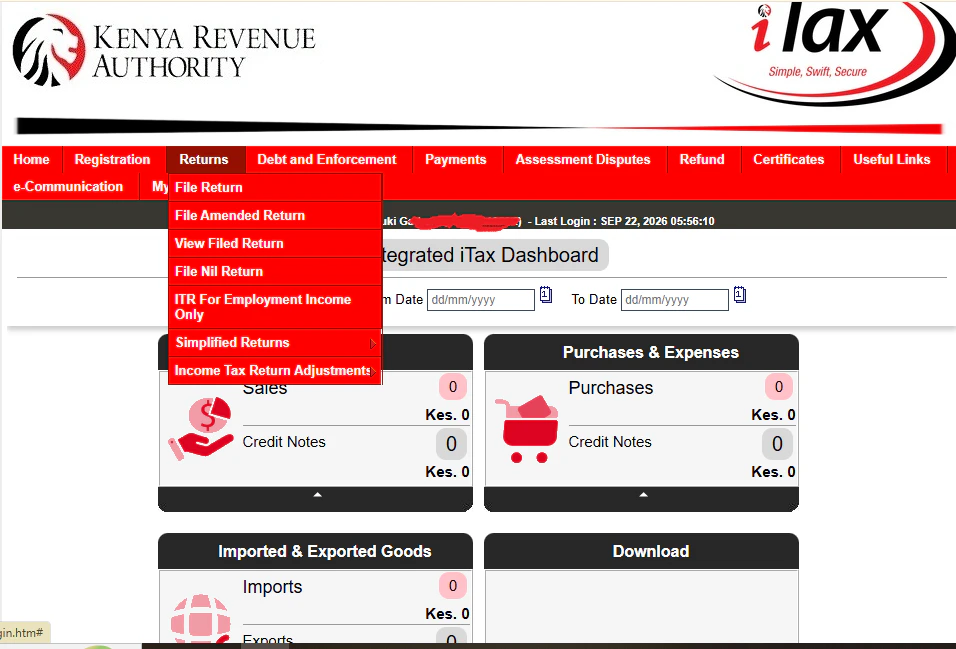
1. Enter your PIN or ID number, then your password, and solve the little arithmetic question.
2. Once you’re in, hover over Returns at the top and choose File Return (or File Nil Return if you had no income at all).
3. Select the right obligation. For most people it’s Income Tax – Resident Individual.
4. Choose the correct year. You’re always filing for the previous calendar year (1 January to 31 December).
From here the path splits a bit depending on your situation.
If you only earned employment income
Many people can now use the simpler “ITR for Employment Income Only” option.
The system often pre-fills your PAYE details from what your employer already submitted.
Check every figure against your P9.
Claim any insurance relief, mortgage interest, or pension contributions you’re entitled to.
Review, submit, and download the acknowledgement receipt straight away.
That receipt is your proof. Keep it safe.
If you have other income (business, rental, etc.) or want the full form
You’ll download an Excel template.
Enable the macros, fill in the sheets carefully (employment on Sheet F, PAYE on Sheet M, tax computation on Sheet T, and so on), then click Validate.
It creates a zip file in your Documents folder.
Go back to iTax, upload that zip, agree to the declaration, and submit.
Again, download the acknowledgement receipt immediately.
Then, go to Payments, then Payment Registration and then click next..just follow the dialogue/steps to generate a Payment Slip (final step is Submit)…..this you do if you found that you have some tax due…otherwise, if there was not tax due, you only need to keep your receipt safely.
iTax returns filing: Filing a nil return
Even quicker. Under Returns choose File Nil Return, select Income Tax – Resident Individual, confirm the period, and submit. Takes a couple of minutes.
How to File KRA Returns Online in Kenya -Other ways to do this
– WhatsApp:
Message Shuru on 0711 099 999 (make sure it’s the verified account).
If you are employed, you can often file their employment income return right there in a few steps.
– USSD:
You can also Dial *222# on your Phone for basic nil returns.
Use these if the portal is slow or it has hanged on you, otherwise the full iTax site is still the most complete option.

Deadlines and what happens if you’re late
For the 2025 income year the deadline was 30 June 2026.
From the 2026 income year onwards (filing in 2027), the rules changed under the Finance Act 2026.
So, if you are individuals with only employment income or nil returns, file by 30 April.
Note that there was a proposal for pure nil filers to file by a new January 31st deadline though parliament suspended that.
Otherwise, companies stay at six months after their year-end.
Always double-check the current year on the KRA site because these dates can shift slightly in practice.
What happens if you miss the dates?
If you miss the deadline, you’re looking at a KSh 2,000 penalty if you are a Kenyan resident individual (or 5% of tax due, whichever is higher), plus interest if you also owe tax.
KRA returns online: A few practical tips for you
– Do it early. The portal slows down badly in the last week.
– Keep that acknowledgement receipt. Screenshot it, email it to yourself, print it—whatever works.
– If numbers don’t match what you expect, use the full Excel IT1 form instead of the simplified one.
– You can amend a return later if you spot a mistake, but it’s better to ensure you get it right the first time.
– Still stuck?
Call or You can also Whatsapp +254 797 532 345 if you want any help on how to go about this.…we are an Official KRA Ushuru Mashinani Partners and we can help you do it right even online..if not, visit a Huduma Centre or KRA offices.
File tax returns Kenya – Final Words
That’s how to File KRA Returns Online in Kenya.
Once you’ve done it once, the next year feels almost routine.
So grab your P9 or your records, open the iTax portal, and do it.
Then remember to request for your Tax compliance certificate..it is an important document to have.