

KRA eTIMS Registration and Setup Guide for Businesses in Kenya
If you’re running a business in Kenya, you’ve probably heard the word eTIMS quite a lot lately.
Maybe you’ve already received a message asking you to register. Or perhaps a customer has asked for an eTIMS invoice and you’re wondering what you’re supposed to do.
Here’s the thing: eTIMS isn’t only for VAT-registered businesses. KRA says that people carrying on business in Kenya are required to onboard eTIMS and issue electronic tax invoices. This includes businesses that aren’t registered for VAT.
The good news is that KRA has several eTIMS options, so you don’t necessarily need an expensive invoicing system to get started.
This guide explains KRA eTIMS registration, the available solutions, what you need before registering, and how to set up eTIMS for your business.
What is eTIMS?
eTIMS stands for Electronic Tax Invoice Management System.
It’s KRA’s system for electronic tax invoicing. Businesses can use different eTIMS solutions depending on the nature and size of their operations.
KRA provides access through computers, laptops, tablets, smartphones and other supported devices.
So whether you’re running a small consultancy from home, a retail shop in town, a hardware business, a restaurant or a larger company, there’s an eTIMS solution that may fit your setup.
Who is Required to Register for eTIMS?
All persons carrying on business in Kenya are required to register and onboard eTIMS. This includes:
- Companies
- Partnerships
- Sole proprietors
- Associations and trusts carrying on business
- Individuals earning business income
- Businesses registered for VAT
- Businesses that aren’t registered for VAT
- Businesses in the informal sector
KRA also identifies income from obligations such as VAT, Monthly Rental Income, Turnover Tax and Excise Duty among income that may need to be declared through TIMS/eTIMS.
So if you’ve been thinking, “My business isn’t VAT registered, so I don’t need eTIMS,” that’s not generally correct.
KRA eTIMS Registration
What Do You Need Before eTIMS Registration?
Before you start, make sure your basic taxpayer information is in order.
You’ll generally need:
- Your KRA PIN
- Business or taxpayer details
- A registered mobile number
- An email address
- Business location information
- Details required by the particular eTIMS solution you’re applying for
For some eTIMS solutions, KRA may require additional documentation. The eTIMS registration portal, for example, provides fields for your information and verification through the mobile number registered with iTax.
If you’re registering a company, it’s also a good idea to make sure the company’s KRA details and business information are accurate before you begin.
How to Register for KRA eTIMS
eTIMS registration Kenya
The registration process is done through KRA’s eTIMS platform.
Here’s the basic process.
Step 1: Visit the eTIMS Portal
Go to the KRA eTIMS taxpayer portal.
From the portal, select Sign Up.
KRA’s registration guide directs taxpayers to access the eTIMS portal and select the Sign-Up option.
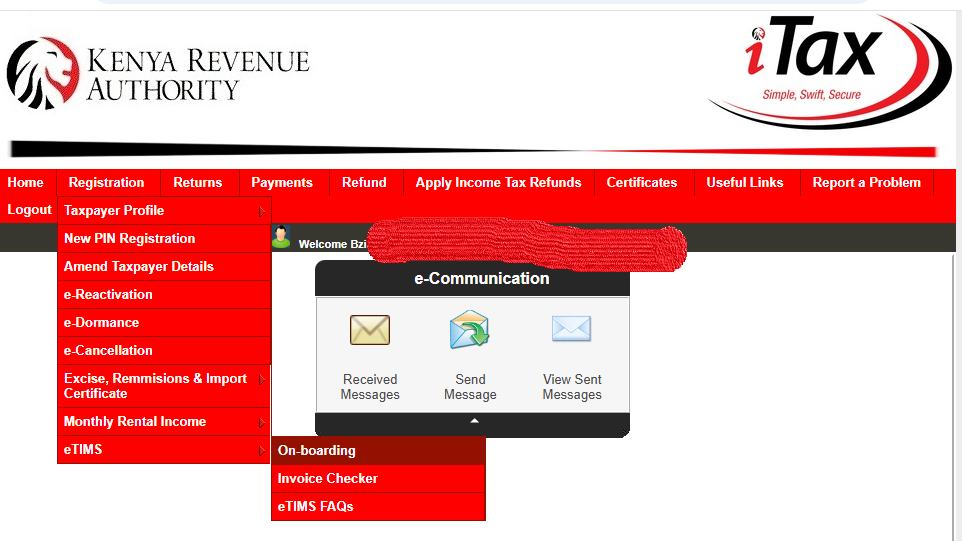
Step 2: Select PIN Registration
You’ll be prompted to select the appropriate registration option.
For taxpayers registering using their KRA PIN, select PIN and proceed with the registration process.
Step 3: Enter Your Taxpayer Details
You’ll need to provide the required taxpayer information.
This may include your:
- KRA PIN
- Taxpayer name
- Mobile number
- Email address
- Business location
- Registration details
The system will verify your PIN and pull the relevant taxpayer information where applicable.
Step 4: Verify Your Account
The eTIMS portal uses an OTP verification process linked to the mobile number registered with KRA.
Make sure you can access the phone number associated with your taxpayer records before starting the registration.
Step 5: Create Your eTIMS Account
Once your details have been verified, complete the required account setup information and create your login credentials.
Keep your login details secure. You’ll need them to access the eTIMS system.
Choosing the Right eTIMS Solution
This is where things get a little more interesting.
KRA doesn’t have just one eTIMS application for everyone.
There are several solutions, including eTIMS Online, eTIMS Lite, eTIMS Client, PayPoint solutions and system-to-system integration.
The right option depends on how your business operates.
eTIMS Lite
KRA provides simplified eTIMS Lite solutions for small and micro taxpayers who aren’t registered for VAT.
The options include:
- eTIMS Lite Web through eCitizen
- eTIMS Lite USSD
- eTIMS Lite mobile application
KRA says these solutions allow eligible non-VAT taxpayers to onboard and generate electronic invoices.
eTIMS Online
The online solution can be useful for businesses that don’t generate a large number of invoices.
KRA identifies service-sector taxpayers who issue no more than 10 invoices per month as examples, including consultants, lawyers, rental property owners and transport service providers.
eTIMS Client
The eTIMS Client is designed for businesses that need a more comprehensive invoicing setup.
KRA’s guidance identifies the solution for taxpayers selling goods and provides Windows and Android options, depending on the setup.
If you’re running a busy shop where you’re issuing several invoices and keeping track of products, you’ll want to look carefully at the solution you’re using rather than simply choosing the first option you see.
System-to-System Integration
Larger businesses with existing accounting, ERP or invoicing systems may use system-to-system integration.
This allows the business system to communicate with KRA’s eTIMS environment.
It’s a more technical setup and usually requires developers or an approved third-party integrator to handle the integration and certification requirements.
How to Set Up eTIMS After Registration
eTIMS setup
Registering is only the beginning.
Once you’re onboarded, you need to configure your invoicing setup so you can actually issue electronic invoices.
Depending on the solution you’ve selected, this can involve setting up:
- Business details
- Invoice information
- Goods or services
- Payment methods
- Customers
- Units of measurement
- Tax rates where applicable
- Invoice numbering and related settings
Take your time with this part.
If you enter incorrect product descriptions, prices or tax information, you may end up having to correct invoices later.
How to Issue an eTIMS Invoice
Once your account is properly set up, you can generate electronic tax invoices through your selected eTIMS solution.
KRA provides tutorials covering invoice generation through eCitizen, the eTIMS Online solution and the eTIMS Client solution.
The exact steps depend on which solution you’re using.
For a simple business, the process may be quite straightforward. A larger business with several sales points, products and employees may need more configuration.
Does eTIMS Apply to Non-VAT Registered Businesses?
Yes.
This is one of the areas that causes a lot of confusion.
KRA specifically states that businesses that aren’t registered for VAT are also required to onboard eTIMS where they are carrying on business.
So don’t assume that eTIMS is only for businesses charging VAT.
A business can be non-VAT registered and still have eTIMS obligations.
What About Small Businesses?
Small businesses aren’t necessarily expected to purchase complicated accounting software just to comply with eTIMS.
KRA has introduced simplified options, including eTIMS Lite, for eligible small and micro taxpayers. These include web, mobile and USSD options.
This is useful if you’re a small trader, consultant, service provider or newly established business that doesn’t have a complicated invoicing system.
Can You Use More Than One eTIMS Solution?
KRA has updated eTIMS to allow you to register on more than one solution and use them simultaneously.
For example, you may have different invoicing needs depending on where sales are being made.
KRA also states that invoices generated through different eTIMS solutions can be accessed through the online taxpayer portal.
However, there are specific rules around changing devices under the same eTIMS Client solution, so it’s worth checking the applicable KRA guidance before making changes.
Common eTIMS Registration Problems
Sometimes the registration process doesn’t go as smoothly as expected.
You may encounter problems because your taxpayer information isn’t updated, the registered phone number isn’t accessible, or the business details don’t match your KRA records.
Other businesses struggle with choosing the right eTIMS solution.
And then there’s the practical side: setting up products, services, prices and users correctly.
If you’re not familiar with KRA systems, this can take longer than expected.
Why Proper eTIMS Setup Matters
Registering for eTIMS is important, but proper setup matters just as much.
Think about your day-to-day business.
If you sell 100 different products, for example, you don’t want your staff manually entering inconsistent descriptions every time they make a sale.
If you’re operating several sales points, you’ll also need a system that fits how your business actually works.
That’s why it’s worth understanding your business operations first and then choosing the appropriate eTIMS solution.
What Happens If You Haven’t Registered for eTIMS?
KRA has stated that persons carrying on business are required to onboard eTIMS and issue electronic tax invoices.
Rather than waiting until you’re asked for an eTIMS invoice, it’s better to review your tax obligations and get your invoicing setup in place.
And if you’ve already registered but haven’t completed the setup, check the status of your account and make sure you’re able to generate the required invoices.
Need Help With KRA eTIMS Registration?
eTIMS support
For many small businesses, eTIMS registration looks simple until they actually start setting everything up.
You may have questions about which solution to use, how to configure your products, how to issue invoices or how eTIMS fits into your existing accounting process.
At BziNex, we can help you with KRA tax compliance, eTIMS registration and setup, so you can spend less time trying to figure out the system and more time running your business. You can call us or Whatsapp +254 797 532 345 now.
Whether you’re in Kenya or outside Kenya, getting your tax and invoicing systems properly organised can make your day-to-day business much easier.
Final Thoughts
eTIMS doesn’t have to be complicated.
The first step is understanding that it applies broadly to people carrying on business in Kenya—not just VAT-registered companies. From there, you need to register, choose an appropriate eTIMS solution and configure it according to how your business operates.
And don’t forget that KRA regularly updates its eTIMS guidance. Before making changes to your setup, it’s sensible to check the latest information on the KRA website.
ALSO READ:
How to File KRA Returns Online in Kenya
How to File KRA Returns Online in Kenya
KRA Tax Compliance Certificate: Requirements and Application in Kenya